The Full Pipeline — From WebSocket to Transcription
Byte ordering, buffer boundaries, thread safety, and the handoff to a transcription API. Integration work where the difficulty is in the details.
The previous posts covered the signal processing: converting mu-law to PCM, computing audio metrics, detecting voice activity with calibrated thresholds. This post covers the plumbing that connects all of it — the WebSocket handler, the Twilio media stream protocol, speech segment accumulation, byte alignment for downstream consumers, and the handoff to a transcription service.
None of this is algorithmically interesting. It is the kind of integration work where the difficulty is in the details: byte ordering, buffer boundaries, thread safety, and making sure the audio that arrives at the transcription API is in exactly the format it expects.
The Twilio media stream protocol
Twilio's bidirectional media stream uses WebSockets and a simple JSON-based protocol with three event types.
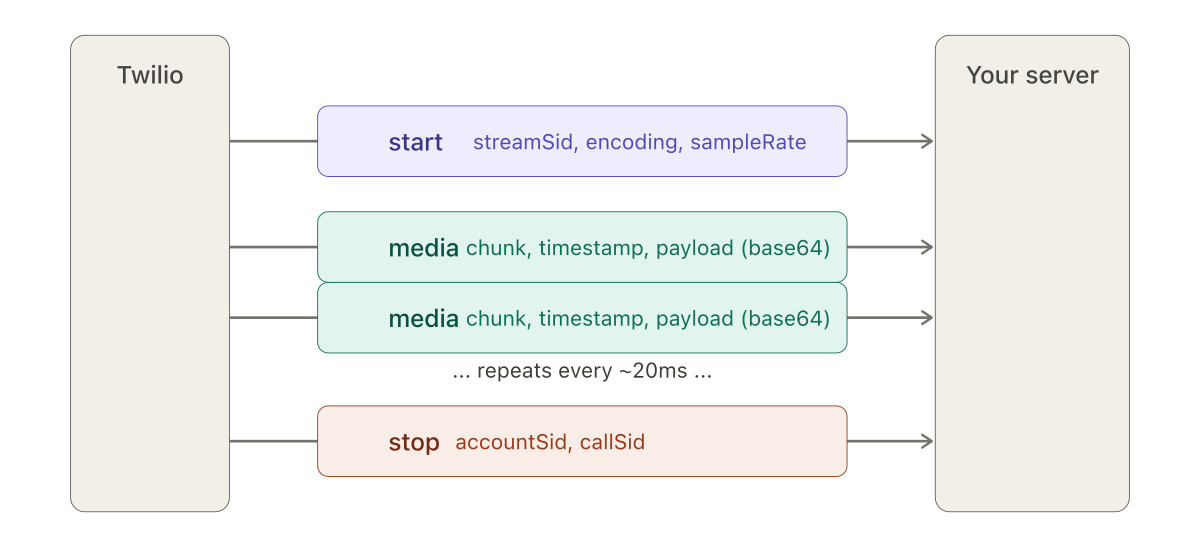
start event tells the server what format to expect. The media events carry the audio, roughly every 20 milliseconds. The stop event closes the stream.The start event arrives once, at the beginning of the stream. It carries the streamSid (a unique identifier for this stream), the media format (audio/x-mulaw, 8000 Hz, 1 channel), and account identifiers. This is where the server learns what encoding to expect.
The media events arrive continuously — roughly every 20 milliseconds — each carrying a base64-encoded audio payload, a chunk number, a timestamp, and the stream identifier. The payload, once decoded, is a byte array of mu-law samples.
The stop event signals the end of the call.
I modeled these as immutable Java objects with Jackson deserialization:
@Value
@Builder
@JsonDeserialize(builder = InboundMedia.InboundMediaBuilder.class)
public class InboundMedia {
  String event;
  String sequenceNumber;
  String streamSid;
  MediaContent media;

  @Value
  @Builder
  @JsonDeserialize(builder = MediaContent.MediaContentBuilder.class)
  public static class MediaContent {
    String track;
    String chunk;
    String timestamp;
    String payload;  // base64 — decodes to raw mu-law bytes
  }
}
The @Value and @Builder annotations from Lombok generate the boilerplate. The nested MediaContent class maps directly to the JSON structure. The key field is payload — a base64 string that, once decoded, yields the raw mu-law bytes.
The WebSocket handler
The Spring Boot WebSocket handler receives text messages, deserializes them, and routes by event type. The media event path is the hot path — it runs for every audio chunk, hundreds of times per second per active call:
public void handleTextMessage(WebSocketSession session, TextMessage message) {
  InboundMedia inbound = objectMapper.readValue(
      message.getPayload(), InboundMedia.class);

  switch (inbound.getEvent()) {
    case "start" -> initializeStream(inbound);
    case "media" -> processMediaChunk(inbound);
    case "stop"  -> finalizeStream(inbound);
  }
}
Inside processMediaChunk, the base64 payload is decoded to bytes, the bytes are converted to floats through the mu-law lookup table, and the float array is passed to the VAD:
private void processMediaChunk(InboundMedia inbound) {
  byte[] audioBytes = Base64.getDecoder()
      .decode(inbound.getMedia().getPayload());
  float[] pcmData = muLawDecoder.byteToFloatArray(audioBytes);
  long timestamp = Long.parseLong(inbound.getMedia().getTimestamp());
  vad.processAudio(pcmData, timestamp);
}
Three conversions in three lines: base64 string to bytes, mu-law bytes to float array, string timestamp to long. Each conversion is a potential failure point if the assumptions are wrong. In practice, Twilio's protocol is reliable and these conversions do not fail. But I kept each step explicit rather than chaining them, to make debugging easier when testing with non-Twilio sources.
Accumulating speech segments
The VAD operates on individual 20ms chunks but speech segments span seconds. Between the chunk-level voice detection and the segment-level transcription handoff, something needs to accumulate the audio.
A ByteArrayOutputStream handles this. It grows its internal buffer as needed without reallocating on every write:
private final ByteArrayOutputStream audioAccumulator =
    new ByteArrayOutputStream();

// When voice is detected:
ByteBuffer buffer = ByteBuffer.allocate(pcmData.length * 2)
    .order(ByteOrder.LITTLE_ENDIAN);
for (float value : pcmData) {
  buffer.putShort((short) (value * 32767.0f));
}
audioAccumulator.write(buffer.array());
Each voice-detected chunk is converted from float to 16-bit PCM and appended to the accumulator. When the silence timeout fires — no voice detected for the configured duration — the accumulator's contents are extracted as a byte array, and the accumulator is reset.
The float-to-PCM conversion mirrors the reverse of what happens at the input. The * 32767.0f scales the -1.0 to 1.0 float range to the -32767 to 32767 range of 16-bit signed integers. The ByteOrder.LITTLE_ENDIAN matches what most transcription APIs expect. A production version should add clipping protection — Math.max(-32767, Math.min(32767, value * 32767.0f)) — to handle any float values that exceed the normalized range.
The alignment problem
The transcription API I was targeting expected audio chunks of a specific size. Not "whatever size the VAD accumulated" — exactly bytesPerChunk. Every chunk sent had to be that size.
The speech segments emitted by the VAD had no predictable length. A short utterance might be 800ms. A long one might be 12 seconds. Neither divides evenly into fixed-size chunks. The last chunk of any segment would almost certainly be smaller than expected.
The AlignedAudioChunkConsumer solved this by buffering:
public class AlignedAudioChunkConsumer {
  private final ByteArrayOutputStream buffer = new ByteArrayOutputStream();
  private final int bytesPerChunk;

  public void accept(byte[] audioData) {
    buffer.write(audioData, 0, audioData.length);
    flushCompleteChunks();
  }

  private void flushCompleteChunks() {
    while (buffer.size() >= bytesPerChunk) {
      byte[] chunk = Arrays.copyOf(buffer.toByteArray(), bytesPerChunk);
      messageHandler.send(chunk);
      byte[] remaining = buffer.toByteArray();
      buffer.reset();
      if (remaining.length > bytesPerChunk) {
        buffer.write(remaining, bytesPerChunk,
            remaining.length - bytesPerChunk);
      }
    }
  }

  public void flush() {
    if (buffer.size() > 0) {
      // Pad the last chunk with silence
      int padding = bytesPerChunk - (buffer.size() % bytesPerChunk);
      for (int i = 0; i < padding; i++) buffer.write(0);
      flushCompleteChunks();
    }
  }
}
Audio data flows in via accept() in whatever size the VAD produces. The buffer accumulates until it has enough for a complete chunk, emits exactly bytesPerChunk bytes, and keeps the remainder. At the end of a speech segment, flush() pads the final partial chunk with zero bytes — silence — to reach the required size.
This is the kind of code that is trivial to describe and easy to get wrong. Off-by-one errors in the buffer math produce audio glitches — clicks, skips, or duplicated samples — that are audible but hard to trace back to a buffer boundary issue. I kept the implementation simple at the cost of extra array copying. A ring buffer would be more efficient but harder to debug.
Threading
The WebSocket handler runs on Tomcat's thread pool. For a single call, messages arrive sequentially over one WebSocket connection, so the per-call processing does not need synchronization.
The transcription handoff is different. Sending audio to an external API is a blocking I/O operation that should not happen on the WebSocket handler thread. Blocking it would stall processing of subsequent audio chunks and introduce gaps in the stream.
I used a LinkedBlockingQueue with a single-thread executor:
private final BlockingQueue<byte[]> transcriptionQueue =
    new LinkedBlockingQueue<>();
private final ExecutorService executor =
    Executors.newSingleThreadExecutor();
When the VAD emits a completed speech segment, it goes onto the queue. The executor thread picks segments off the queue and sends them to the transcription API. The single thread ensures segments are processed in order. The blocking queue handles the producer-consumer coordination without explicit locking.
This is a standard pattern, but worth noting because the alternative — processing transcription synchronously on the WebSocket thread — was what I started with, and it caused exactly the problem you would expect. Under load, the transcription API latency (200–500ms per segment) backed up the audio processing, and chunks were delayed. The queue decoupled the two timelines.
The full path
The complete audio path, from phone call to transcript:
Twilio sends a JSON message over WebSocket. The handler deserializes it, extracts and decodes the media payload, converts mu-law bytes to floats through the lookup table, and passes the float array to the VAD with its timestamp. The VAD either calibrates (if still in the calibration window) or evaluates the chunk against thresholds. If voice is detected, the chunk is converted to 16-bit PCM and appended to the accumulator. When silence exceeds the timeout, the accumulated segment is placed on the transcription queue. The executor thread picks it up, runs it through the chunk aligner, and sends it to Google Speech-to-Text.
Each stage has a specific data format. JSON string → InboundMedia object → base64 string → mu-law byte[] → float[] → PCM-16 byte[] → aligned chunks → API request. Getting any format wrong at any boundary produces output that is structurally valid but acoustically wrong.
The Google client — the anticlimactic part
The Google SpeechClient setup was straightforward. Credentials from a service account JSON file loaded via Spring's ResourceLoader, configured at bean initialization, and closed on shutdown via @PreDestroy. The API call itself was the simplest part of the entire pipeline.
That asymmetry is worth noting. Several weeks of work on VAD design, signal processing, and buffer management. The transcription call — the visible output of all that work — was a few lines of boilerplate. The difficulty was everything upstream of it.
What comes next
This post covers the server side. The final post in the series covers the other half: the JavaScript client that captures microphone audio, the AudioWorkletProcessor for streaming playback, and the test harness that let me simulate phone calls from a browser without touching a real phone line. That test harness turned out to be as important as any of the server-side work — without it, iteration on the VAD would have been far slower.