The Web Audio API's Sharp Edges — AudioWorklets, Feedback Loops, and Format Juggling
The server-side VAD could not be tested without a client. Building that client exposed more bugs than Twilio ever would have.
The server-side voice activity detector was the core of the project, but it could not be tested without an audio source. Twilio provides the production stream, but waiting for a real phone call to exercise every code path is impractical. I needed a browser-based test harness: capture microphone audio, convert it to the same format Twilio sends, stream it over a WebSocket, and play back the AI's response — all while simulating the timing characteristics of a real call.
This post covers the JavaScript side of the system. It is less about algorithms and more about the Web Audio API's sharp edges.
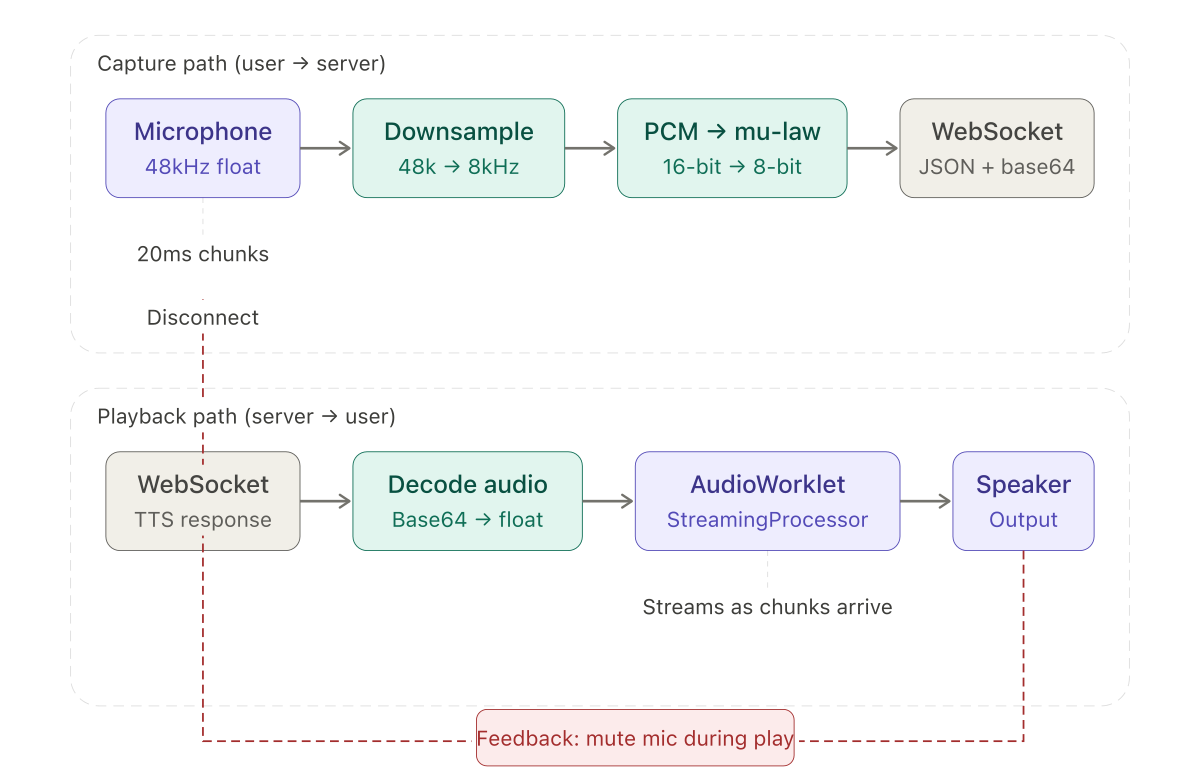
The capture path
The browser captures microphone audio through getUserMedia, which returns a MediaStream at the device's native sample rate — typically 48000 Hz. The server expects 8000 Hz mu-law. The client needs to downsample, encode, and chunk the audio before sending.
Downsampling from 48kHz to 8kHz is a 6:1 ratio. The simplest approach — take every sixth sample — works:
function downsample(buffer, ratio) {
  const result = new Float32Array(Math.floor(buffer.length / ratio));
  for (let i = 0; i < result.length; i++) {
    result[i] = buffer[i * ratio];
  }
  return result;
}
This is technically wrong. Dropping samples without a low-pass anti-aliasing filter introduces aliasing artifacts — frequencies above the Nyquist limit of the target rate fold back into the audible range. In a production system, you would apply a filter before downsampling. For telephony speech at 8kHz, the aliasing is inaudible enough that the simple approach worked during development. I noted it as a future improvement and moved on.
After downsampling, the floats are converted to 16-bit PCM and then to mu-law:
function floatToPcm16(input) {
  const output = new Int16Array(input.length);
  for (let i = 0; i < input.length; i++) {
    const s = Math.max(-1, Math.min(1, input[i]));
    output[i] = s < 0 ? s * 0x8000 : s * 0x7FFF;
  }
  return output;
}
The mu-law encoding function uses a lookup table for the exponent and packs the sign, exponent, and mantissa into a single byte — the reverse of the server-side decompression described in an earlier post. The asymmetry is visible here: decoding is a table lookup, encoding is bit manipulation with clamping and edge cases.
Each 20ms chunk of mu-law bytes is wrapped in the Twilio-style JSON structure — event: "media", sequenceNumber, media.payload as base64 — and sent over the WebSocket. The server cannot tell the difference between this and a real Twilio stream.
The file upload path
For repeatable testing, I added a file upload option. Select a WAV or MP3 file, and the client sends it chunk by chunk at real-time pace, simulating a caller speaking.
The Web Audio API's decodeAudioData handles format detection and conversion:
const arrayBuffer = await file.arrayBuffer();
const audioContext = new AudioContext();
const audioBuffer = await audioContext.decodeAudioData(arrayBuffer);
const channelData = audioBuffer.getChannelData(0);
const fileSampleRate = audioBuffer.sampleRate;
One detail cost me time. AudioBuffer does not expose the original file's encoding. decodeAudioData converts everything to 32-bit float PCM internally. This is usually fine — you want the floats — but it means you cannot tell whether the source was 16-bit WAV, 24-bit FLAC, or compressed MP3. For my purposes this did not matter, since the next step was downsampling and mu-law encoding regardless of source format.
The file is processed in chunks matching real-time pace:
for (let i = 0; i < channelData.length; i += fileSamplesPerChunk) {
  const chunk = channelData.slice(i, i + fileSamplesPerChunk);
  const downsampled = downsample(chunk, downsampleRatio);
  const pcm = floatToPcm16(downsampled);
  const mulaw = pcm16ToMuLaw(pcm);
  sendMediaEvent(mulaw);
  await new Promise(resolve => setTimeout(resolve, CHUNK_DURATION_MS));
}
The setTimeout between chunks simulates the timing of a real audio stream. Without it, the entire file arrives at the server in milliseconds, overwhelming the VAD's time-based silence detection. With it, the server sees the same timing pattern it would see from Twilio.
Streaming playback with AudioWorkletProcessor
My first implementation accumulated all the response chunks, decoded the full audio, and played it back. This worked but added noticeable latency — the client waited for the entire response before playing anything.
The fix was an AudioWorkletProcessor that starts playing as soon as the first chunk arrives:
class StreamingProcessor extends AudioWorkletProcessor {
  constructor() {
    super();
    this.buffer = new Float32Array(0);
    this.bufferIndex = 0;
    this.port.onmessage = (event) => {
      if (event.data.type === 'audioData') {
        this.appendToBuffer(event.data.data);
      }
    };
  }

  process(inputs, outputs) {
    const output = outputs[0][0];
    for (let i = 0; i < output.length; i++) {
      if (this.bufferIndex < this.buffer.length) {
        output[i] = this.buffer[this.bufferIndex++];
      } else {
        output[i] = 0;
      }
    }
    return true;
  }
}
The worklet runs on a separate audio thread. The main thread sends decoded float arrays via port.postMessage. The process method — called by the browser's audio system roughly every 128 samples — reads from the buffer and outputs to the speaker. When the buffer runs dry, it outputs silence.
The appendToBuffer method merges new data with any unplayed data remaining in the buffer. It must not lose samples from the existing buffer when new data arrives:
appendToBuffer(newData) {
  const remaining = this.buffer.length - this.bufferIndex;
  const newBuffer = new Float32Array(remaining + newData.length);
  newBuffer.set(this.buffer.subarray(this.bufferIndex));
  newBuffer.set(newData, remaining);
  this.buffer = newBuffer;
  this.bufferIndex = 0;
}
A sample rate mismatch between the incoming audio and the AudioContext caused one of the more confusing bugs in the project. The AI's TTS output was at 24000 Hz. The AudioContext defaulted to the device's native rate — 48000 Hz. The audio played at double speed, making the AI sound like a chipmunk. The fix was setting the AudioContext sample rate explicitly: new AudioContext({ sampleRate: 24000 }).
The feedback problem
When the AI's response plays through the speaker, the microphone picks it up. The server's VAD detects it as speech. The system thinks the caller is talking and tries to transcribe the AI's own output. In a real phone call with Twilio, some degree of echo cancellation is built into the network. In a browser test harness, there is none.
My initial approach was straightforward: disconnect the microphone before playback, reconnect it after:
// Before playback
microphoneProcessor.disconnect();
microphoneEnabled = false;

// Play audio...

// After playback
microphoneProcessor.connect(audioContext.destination);
microphoneEnabled = true;
This did not work with the AudioWorkletProcessor. The problem is timing. The worklet processes audio asynchronously on a separate thread. When you send audio data to the worklet via postMessage, it enters the buffer but does not play immediately. The main thread code that disconnects the microphone, sends the data, and reconnects the microphone runs synchronously — all three operations complete before the worklet has played a single sample.
The fix was to let the worklet signal playback state:
// In the worklet's process() method:
if (this.bufferIndex < this.buffer.length && !this.isPlaying) {
  this.isPlaying = true;
  this.port.postMessage({ type: 'playbackStarted' });
}
if (this.bufferIndex >= this.buffer.length && this.isPlaying) {
  this.isPlaying = false;
  this.port.postMessage({ type: 'playbackEnded' });
}
The main thread listens for these messages and manages the microphone accordingly:
workletNode.port.onmessage = (event) => {
  if (event.data.type === 'playbackStarted') disableMicrophone();
  if (event.data.type === 'playbackEnded') enableMicrophone();
};
The microphone is disconnected when the worklet actually starts outputting audio, not when the main thread sends the data. Moving the state machine into the worklet closes the timing gap.
Testing with synthetic audio
For automated testing, I needed audio that would reliably trigger or not trigger the VAD without depending on microphone input or pre-recorded files. Synthesizing white noise at a controlled amplitude served this purpose:
function generateWhiteNoise(duration, dbLevel) {
  const samples = duration * SAMPLE_RATE;
  const amplitude = Math.pow(10, dbLevel / 20);
  const noise = new Float32Array(samples);
  for (let i = 0; i < samples; i++) {
    noise[i] = (Math.random() * 2 - 1) * amplitude;
  }
  return noise;
}
White noise at -30 dB sits below any reasonable energy threshold. At 0 dB it is loud enough to trigger energy detection but — crucially — has high ZCR and a high spectral centroid. The VAD correctly rejects it as non-speech. This validated the multi-metric approach: loud noise that would have triggered the energy-only detector was rejected by the combined logic.
Appending one second of silence to the end of a test file ensured the VAD's silence timeout would fire and emit the final speech segment. Without trailing silence, the last utterance in a test file would sit in the accumulator indefinitely — the VAD would detect speech and keep waiting for more.
What the client revealed about the server
The test harness was not just a convenience. It exposed several server-side bugs that would have been difficult to find through Twilio alone.
The mu-law conversion noise — described in an earlier post — was first identified through the browser client. The double-speed playback bug was caught because I could hear it immediately. The silence timeout issue with file uploads surfaced because test files have a hard end rather than trailing silence. The aligned chunk consumer's off-by-one error produced a click every few seconds that was audible in the browser but would have been masked by phone-line compression in a Twilio call.
A browser-based test harness with controllable inputs — microphone, files, synthetic audio — and audible outputs is not optional for audio pipeline development. Without it, debugging is guesswork.
Looking back
This series started with a cost problem: streaming all audio to a transcription API wastes money on silence. The solution was a voice activity detector, built in Java, that identifies speech boundaries in real-time telephony audio.
The implementation required more audio engineering than I expected. Mu-law decoding, sample rate management, byte alignment — the plumbing consumed more development time than the signal processing. The signal processing itself — energy, zero-crossing rate, spectral centroid, pitch detection, auto-calibration — was incrementally developed against specific failure cases, each metric added because the previous set was insufficient.
The entire project was built through conversational AI between August and November 2024, before agentic coding tools existed. The constraint of articulating every problem through a chat interface was occasionally tedious and unexpectedly clarifying. The code exists and runs in production. The conversations — dozens of them, covering everything from sinc interpolation to ByteArrayOutputStream to the Web Audio API — are the development log.
If there is a single takeaway, it is that audio processing rewards specificity. Every silent bug in this project came from a mismatch between what the code assumed about the data and what the data actually was. Mu-law bytes treated as PCM pairs. A resampler running at 1:1 ratio. A duration calculation using the wrong bytes-per-sample. A microphone muted before playback starts. Each one produced output that looked structurally valid. None of them produced errors. The signal was always there — it was just wrong.