Deploying AI to the Edge — Lessons from Cloudflare Pages + D1 + Vercel AI SDK
The gap between "it works locally" and "it works in production" is where most side projects die. Here's a field guide.
The stack behind the chat assistant on this site is: Cloudflare Pages for the static site, Pages Functions for the serverless backend, D1 for SQLite storage, the Vercel AI SDK for LLM abstraction, Telegram Bot API for human escalation, and Web Push for delayed notifications. Total cost to run at low volume: effectively free on Cloudflare's free tier, plus a few dollars a month in LLM API calls.
But getting from "it works on localhost" to "it works in production" involved debugging issues that no tutorial warned me about. This post is the field guide I wish I had — the specific gotchas of deploying an LLM-powered application on Cloudflare's edge runtime.
If you want to understand the architecture decisions behind the chat assistant itself, read the previous post. This one is about making it run.
Cloudflare Pages + Functions: what they don't tell you
Cloudflare Pages Functions deploy automatically from a /functions directory in your repository. In theory, you push code, Cloudflare detects the functions, and they are available at the corresponding URL paths. In practice, there are several things that can go wrong silently.
The first surprise: my site started as pure static HTML under public/. No build step. The Cloudflare Pages build command was empty. This worked perfectly for the static site — but when I added Functions, they were never detected. No error, no warning. The build just produced a static deployment with no function support. The fix was setting the build command to npm install, which triggers Cloudflare's function detection pipeline even when you have no actual build step.
The second surprise: Production and Preview are separate environments with separate configurations. Every binding, every secret, every environment variable must be configured for both. Miss a secret in Preview and your preview deployment silently fails with 500 errors. The Cloudflare dashboard has separate tabs for each — it is easy to configure one and forget the other.
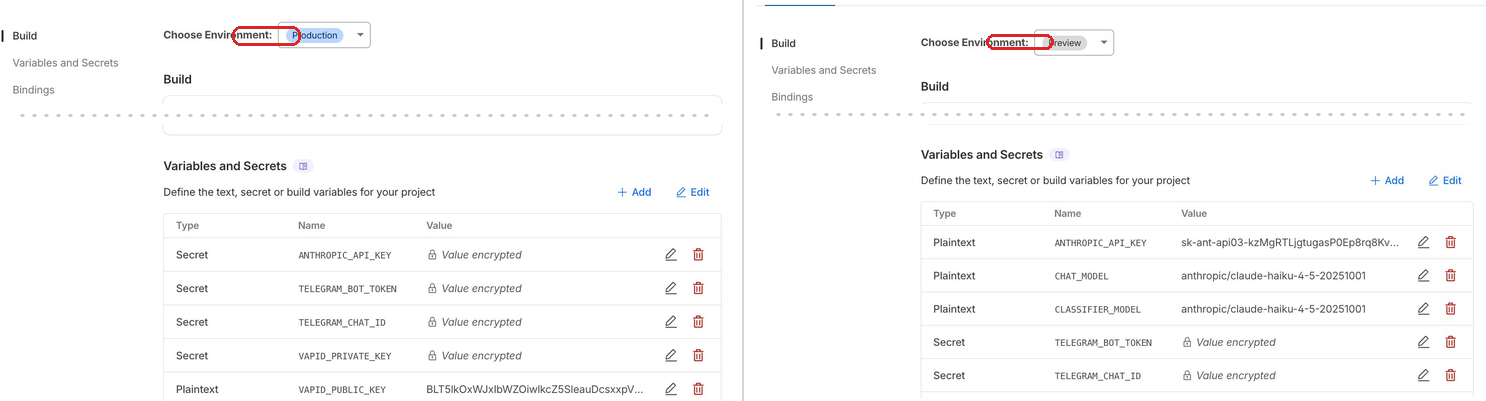
The third surprise: the D1 binding you configure in the dashboard (for production) is separate from the binding in wrangler.jsonc (for local development). You need both. And schema migrations are separate too — --remote for production, --local for development. They must use the same persistence location locally or you get "no such table" despite having run the migration.
# This applies schema to production D1
wrangler d1 execute my-database --remote --file=src/db/schema.sql

# This applies locally — but ONLY if the dev server
# uses the default persistence location
wrangler d1 execute my-database --local --file=src/db/schema.sql
I learned the remote migration lesson the hard way. After deploying Functions for the first time, every API call returned a 500. I tried to tail the deployment logs to debug it:
[ERROR] A request to the Cloudflare API failed.

  You can not tail this deployment as it does not have
  a Pages Function, you cannot tail a static site.
  Deploy a Function to begin tailing. [code: 8000098]
This error message is misleading. The Functions were deployed — they were just crashing immediately because the D1 schema had never been applied to the remote database. I had run the migration locally dozens of times but never with --remote. One command fixed everything.
And one more: the double-slash webhook bug. If your Telegram webhook URL has a trailing slash on the base URL, you end up with //api/telegram-webhook in the path. The Telegram API accepts this URL without complaint. It returns 200 OK. But the request never routes to your function because Cloudflare does not match the double-slash path. No error anywhere — just silence.
The Vercel AI SDK in a non-Vercel environment
The Vercel AI SDK is excellent. Provider abstraction, structured output, streaming, tool use — it does a lot of things well. But it was designed with Vercel's runtime in mind, and Cloudflare Workers are not that runtime.
The most immediate issue: the SDK assumes process.env exists. Cloudflare Workers do not have process.env. If you use the bare anthropic() import, it tries to read ANTHROPIC_API_KEY from the environment and fails silently. You must pass API keys explicitly:
// This won't work on Cloudflare Workers:
import { anthropic } from '@ai-sdk/anthropic';

// This will — pass the key explicitly from the env binding:
import { createAnthropic } from '@ai-sdk/anthropic';
const provider = createAnthropic({ apiKey: env.ANTHROPIC_API_KEY });
The same pattern applies to every provider. If you are running outside Vercel, always use the create* factory functions and pass credentials from your runtime's environment bindings.
Mid-project, generateObject() was deprecated in favor of generateText() with Output.object(). The migration was straightforward, but it is a reminder to check the actual SDK changelog before building — not the tutorials, which may reference older APIs.
A subtler issue: Zod schema constraints. If you use .min() or .max() on number fields in your schema, the Vercel AI SDK passes those constraints to the model's structured output API. Anthropic's API rejects them — it does not support numeric range constraints in tool schemas. The fix is to strip constraints from the schema and validate the returned values in your own code afterward.
Finally, prompt caching. With Anthropic, you can cache the system prompt so it is not re-processed on every turn of a multi-turn conversation. The trick is attaching the cache directive to the system message, not the top-level call:
// Prompt caching — cache the system prompt,
// pay full price only for new messages
const result = await generateText({
  model: getChatModel(env),
  messages: [
    {
      role: 'system',
      content: systemPrompt,  // large, stable — gets cached
      providerOptions: {
        anthropic: { cacheControl: { type: 'ephemeral' } },
      },
    },
    ...conversationHistory,   // small, changes each turn
    { role: 'user', content: userMessage },
  ],
});
Without prompt caching, a multi-turn conversation with a large system prompt (which includes all the curated facts and behavior rules) gets expensive fast. With caching, the stable prefix is served at 10% cost after the first message. On a site with an always-present chat widget, that matters.
Web Push: the hidden complexity
Web Push was the feature I underestimated most. The concept is simple — send a notification to a browser even when the page is closed. The implementation has sharp edges everywhere.
Start with VAPID keys. You generate a key pair once and store it permanently. The same keys must be used across all environments. Generate them with npx web-push generate-vapid-keys and add them to your secrets.
The service worker must live at the site root — /sw.js — for correct scope. If you put it in a subdirectory, it can only control pages within that directory. And the service worker and the main page are separate execution contexts. A push notification click can focus the browser tab, but it cannot directly tell the page to refresh its messages. I worked around this with a polling check, but it is an awkward gap in the API.
Browser-specific issues: Brave fails entirely. It uses its own push infrastructure, and subscription attempts throw a "push service error" that gives you nothing to debug. Safari and Chrome work. If your users report missing notifications, the first question is which browser they use.

The deeper issue is OS-level notification settings. On macOS, if notifications are disabled for the browser in System Settings, push subscriptions succeed, the push event fires in the service worker, but the notification never appears. No error. No way to detect it from code. The user's OS silently suppresses everything, and your application has no idea.
Permission timing matters too. Asking for push permission on page load is hostile — the user has no context for why they should allow it, and browsers increasingly penalize sites that do this. The right moment is after escalation, when the assistant has explained that Peter will reply and the visitor has a concrete reason to say yes. Conversion on push permission is significantly higher when there is an obvious benefit.
Making it repeatable
After debugging all of these issues manually the first time, I invested in automation to make sure I would never have to do it again — and to make the project usable as a template for others.
The setup script is an interactive CLI that walks you through the entire configuration. It asks questions (domain, project name, Telegram token, LLM provider), generates .dev.vars with all your secrets, creates wrangler.jsonc with the D1 binding, generates VAPID keys, creates the D1 database, applies the schema, and produces a personalized deployment guide with only the manual steps that remain.
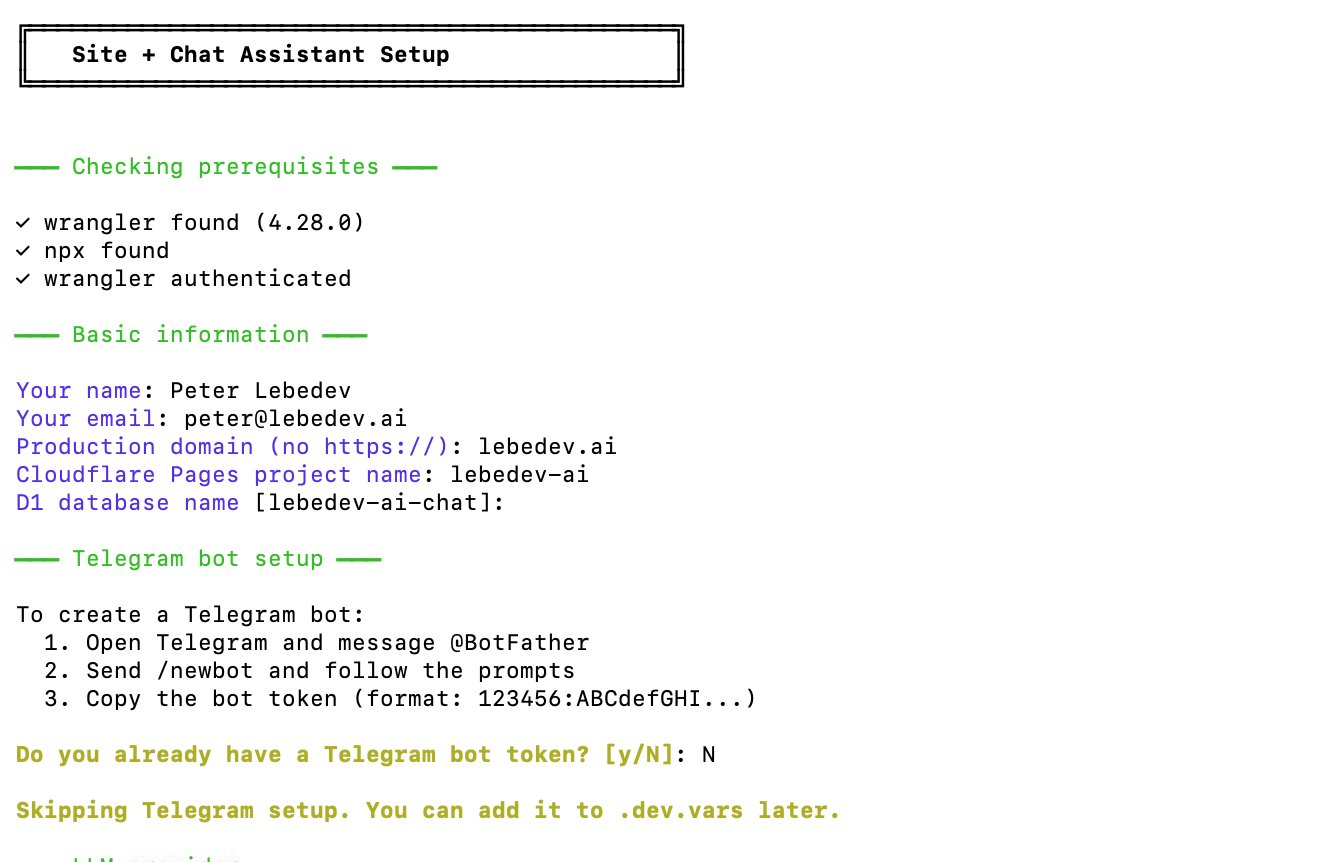
.dev.vars, wrangler.jsonc, VAPID keys, D1 database, and a personalized deployment guide.# Instead of a README with 47 manual steps:
./scripts/setup.sh
# Asks: domain? project name? Telegram token? LLM provider?
# Creates: .dev.vars, wrangler.jsonc, webhook script, deployment guide
# Output: "Read DEPLOY_GUIDE.md for the 5 manual steps remaining"The interview slash command takes a similar approach for content. Instead of manually editing TypeScript files to update the assistant's knowledge base, you run a conversational data collection process. It asks about personal facts, work preferences, and screening criteria, then writes the structured data files. No TypeScript knowledge required.
Each major feature was implemented as a phase plan — a self-contained markdown file describing what to build, what files to change, and what the acceptance criteria are. Claude Code reads the plan and implements it directly. This pattern made the entire development process repeatable: write a plan, hand it to the AI, review the result.
The next step is extracting the hardcoded parts — my name, my facts, my styling choices — into configuration, so the whole project becomes a template that anyone can fork and personalize. The architecture already supports this; it is mostly a refactoring exercise.
The deployment checklist
Distilled from everything above, here is the checklist I wish I had on day one:
- Configure secrets and bindings for both Production and Preview in the Cloudflare dashboard.
- Apply the D1 schema to the remote database with
--remote. - Set the Telegram webhook URL with no trailing slash on the base URL.
- Generate VAPID keys and store them as secrets.
- Place the service worker at the site root (
/sw.js). - Set the build command to
npm install(even if you have no build step). - Set the build output directory to
public.
Miss any one of these and something fails silently.
The full picture
Total time from "I want a professional site" to "production chat assistant with Telegram escalation and push notifications": a few focused sessions with AI assistance. The stack costs nothing to run at low volume. Cloudflare's free tier covers hosting, functions, and database. The only variable cost is LLM API calls — pennies per conversation with Haiku.
The biggest lesson across this entire project: AI dramatically accelerates implementation, but deployment is still about understanding your infrastructure. No amount of code generation helps you when the issue is a missing dashboard checkbox or an OS-level notification toggle. The gap between "it works locally" and "it works in production" is not a code gap — it is an operations gap. And closing that gap still requires knowing how the pieces fit together.
This is the third post in the series. The first post covers building the landing page with AI assistance. The second post covers the chat assistant's architecture. Together, they cover the full journey from resume to production.